







MT5 API + AI: Build an Automated Bot Just by Talking

Now that you can easily pull historical candlesticks and generate charts, it is time for the ultimate step in our series: building your first fully functional MT5 trading bot without writing a single line of code. Leveraging the data foundation you established in our previous price retrieval guide, this final article transitions your workspace into a complete system for automated execution.
By the end of this guide, you will be able to transform your trading ideas into a fully operational system using nothing but plain English instructions to Claude Code. Here is exactly what we are accomplishing today:
- Create Your Bot – Describe your unique trading rules to the AI and watch it instantly generate a robust, clean automated trading script.
- Test the Strategy – Run a comprehensive strategy backtest on historical data to evaluate how your rules would have performed in the past.
- Deploy Safely – Launch your newly created strategy directly onto a demo account to verify its behavior and execution in live market conditions with zero financial risk.
Assuming you already have your setup running from the previous parts of this series, you are just a few plain-language commands away from launching your own code-free algo-trading system.
Let's dive in!
The big picture of automated trading
Getting from idea to live automated trading follows four steps:

The most important step is Step 1 - "Define Your Rules." AI can write the code, but deciding what strategy to trade is up to you.
Why Python instead of MQL5?
When it comes to automating strategies on MetaTrader 5, the traditional route is building an EA (Expert Advisor) using MQL5 - the platform's native programming language.
In this series, however, we are doing things differently by using Python to control MT5 externally. Let's break down exactly why we made this choice, the massive advantages it gives you, and the trade-offs you should keep in mind.
Can't MQL5 Talk to AI?
Technically, yes. MQL5 features a built-in WebRequest() function that allows it to communicate with the outside world via HTTP.
However, trying to connect MQL5 directly to modern AI systems is a massive headache. You would have to manually code JSON parsers and build complex API integrations for tools like Claude or OpenAI entirely from scratch. It requires an immense amount of advanced coding just to get a basic response.
Why Python wins
Python is the undisputed king of artificial intelligence and data science. Instead of reinventing the wheel, Python gives you access to official, plug-and-play SDKs from every major AI provider. Integrating advanced AI like Claude takes just a simple library installation and a few lines of clean code.
Furthermore, using Python opens the door to a massive ecosystem of external tools that would be practically impossible to build using MQL5 alone. Later in this journey, Python will allow you to easily create:
- Custom GUI Dashboards – Beautiful, personalized visual interfaces to monitor your trades.
- Instant Notifications – Live alerts sent straight to your Telegram, Discord, or mobile phone.
- Advanced Data Analytics – Interactive charts and automated PDF performance reports generated instantly.
The Verdict: If your goal is to build an intelligent trading ecosystem that extends beyond the borders of a basic charting platform, Python is the natural, undisputed choice.
The Trade-offs
To be completely fair, no setup is perfect. While Python gives us incredible AI flexibility, it comes with a few trade-offs compared to native MQL5 scripts:
- Order Execution Speed - python communicates with MT5 via an external bridge (inter-process communication). This adds a tiny fraction of latency compared to MQL5 code running natively inside the platform. For standard algorithmic trading this is irrelevant, but if you are building an ultra-fast high-frequency scalping bot, MQL5 is still king.
- No Native Strategy Tester - MQL5 scripts can directly tap into MT5’s built-in Strategy Tester for tick-level optimization. External Python scripts cannot use this tool natively, meaning historical data testing must be handled via Python's data libraries.
- Two Programs Running - for your bot to work, both your Python environment and your MT5 terminal must be running on your machine simultaneously. With an MQL5 EA, the MT5 platform alone is enough.
How to choose your tool
Choose MQL5 if... | Choose Python if... |
Your strategy requires ultra-low latency and millisecond execution (e.g., heavy scalping). | You want to integrate cutting-edge AI models like Claude seamlessly. |
| You want to fully utilize MT5’s built-in Strategy Tester right out of the box. | You want to connect your trading to external apps (Telegram, web dashboards, databases). |
You want your automated system to run entirely inside a single platform. | You want advanced data visualization, machine learning, and flexible automation. |
Build your automated trading bot
Now that you understand why we are using Python, it is time to open Claude Code and start building. You don't need to worry about the underlying syntax; your only job is to clearly explain your market logic to the AI, and it will handle the heavy lifting of turning those concepts into operational code.
Let’s look at how this works in practice.
Step 1: Define your trading rules
Let's start with a simple rule. For this article, we will use a classic moving average (MA) crossover strategy as our example.
Our trading rules:
- Instrument: USD/JPY
- Timeframe: 1-hour (H1)
- Buy entry: When the 20-period MA crosses above the 50-period MA (golden cross)
- Sell entry: When the 20-period MA crosses below the 50-period MA (dead cross)
- Lot size: 0.01 lots (minimum)
- Exit: Close and reverse position on the opposite signal
This rule is purely a learning example. For actual trading, use a strategy based on your own analysis and validation.
Step 2: Let AI Write the Code
Once you have defined the rules, just tell Claude Code what you want.
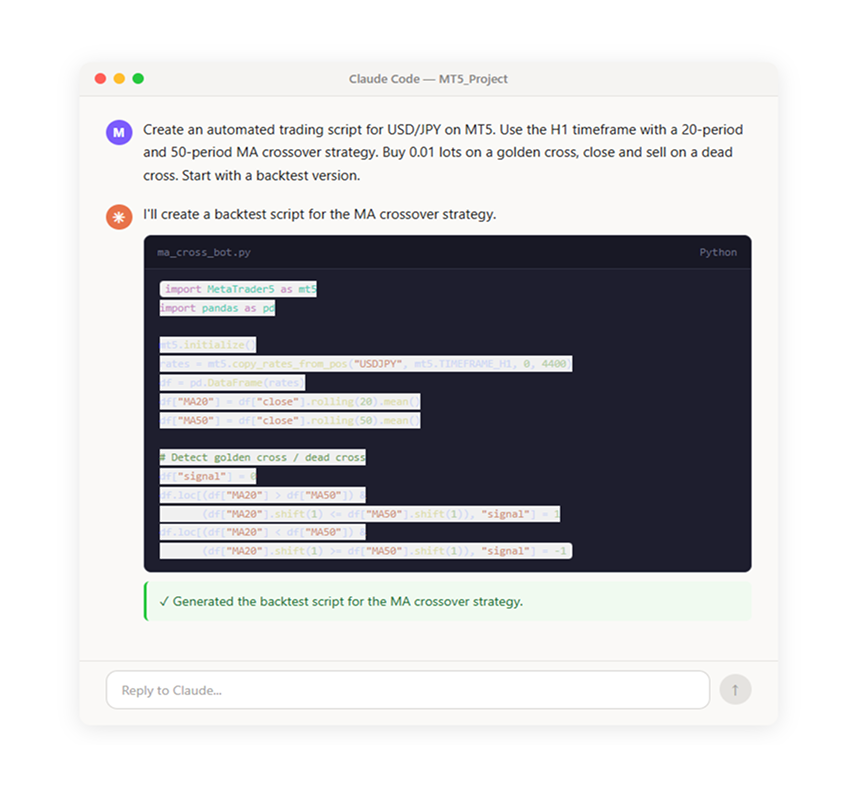
You don't need to understand every detail, but it is important to verify that the AI-generated code matches your intended rules. If anything is unclear, just ask Claude Code "What does this part do?" and it will explain in plain language.
Step 3: Backtest and validate
Once the code is ready, we validate the strategy against historical data. Backtesting is a critical step that shows how the strategy would have performed in the past—before risking any real money.
To kick this process off, simply tell Claude Code to execute the script and run the backtest directly within your project environment:
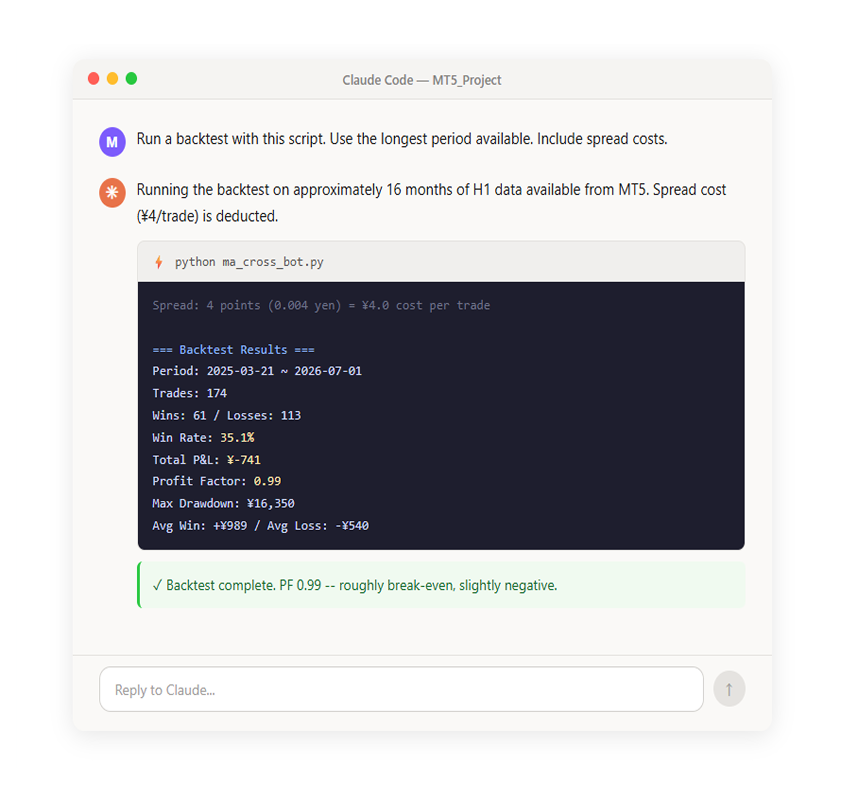
Once the backtest completes, seeing raw numbers isn't always enough to judge a strategy - you need to actually look at how it behaved over time. To get a clear view of your performance, just ask the AI to map out your trades and your account balance visually:
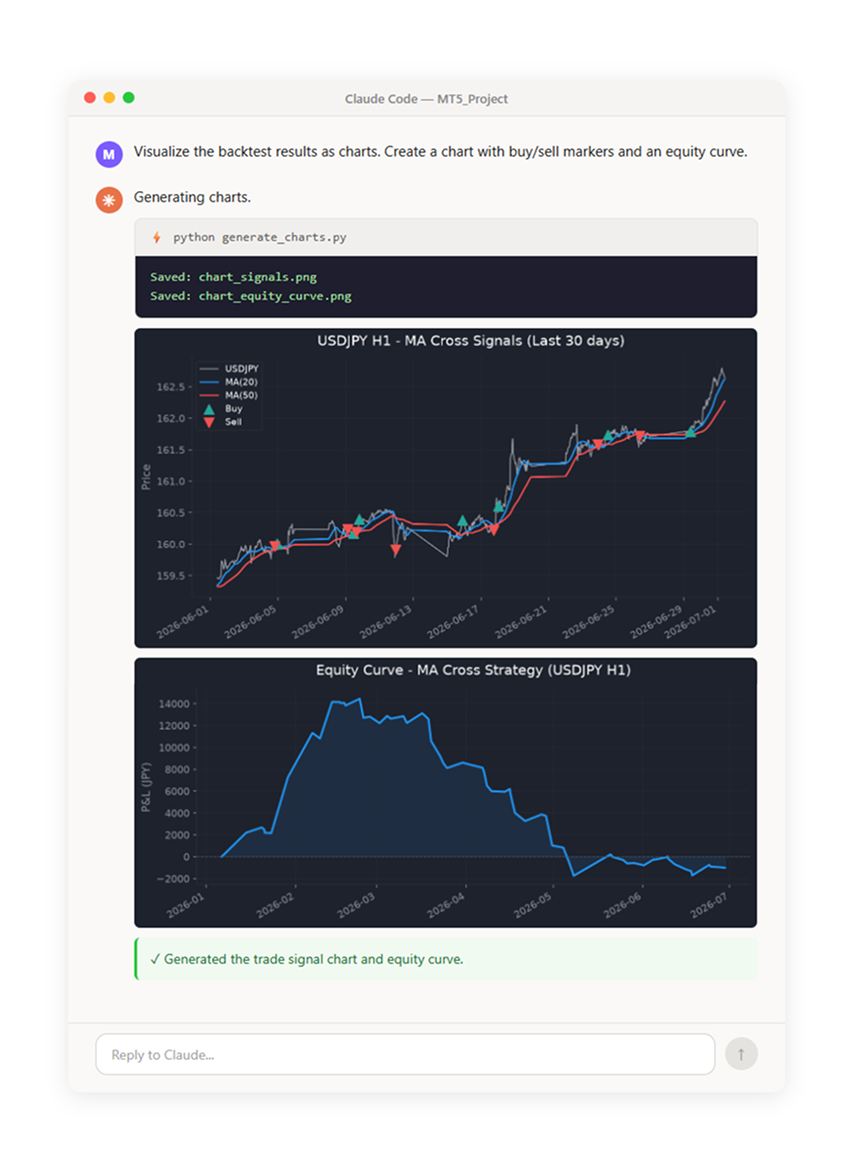
If the numbers and charts are hard to interpret on their own, you can ask Claude Code "Analyze these results and tell me the strategy's strengths and weaknesses" - it will provide commentary on each metric along with improvement suggestions.
Key backtest metrics to remember:
- Win Rate - The percentage of trades that ended in profit
- Profit Factor (PF) - Total profits divided by total losses. Above 1.0 means net profit; generally 1.5 or higher is considered desirable
- Max Drawdown (DD) - The largest peak-to-trough decline in account equity. A measure of risk
- Avg Win / Avg Loss - The ratio of average winning trade to average losing trade. Also known as the risk-reward ratio
Improving the strategy
A Profit Factor (PF) of 0.99 means the strategy is essentially breaking even after transaction costs. The real magic of working with Claude Code is that you can iteratively upgrade your system through a simple, conversational loop: adjust the rules, run a new backtest, and review the updated metrics.
Improvement 1: Add stop loss and take profit
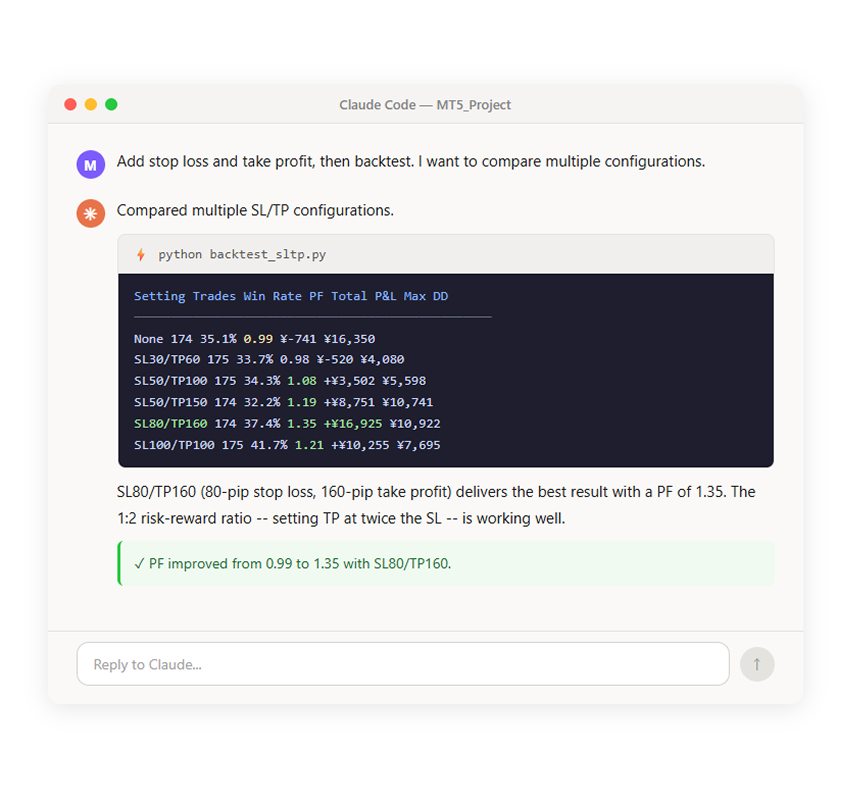
To turn this break-even system into a professional strategy, our first step is to implement classic risk management by telling the AI to add a strict Stop Loss (SL) and Take Profit (TP) measured in pips, allowing us to compare multiple configurations:
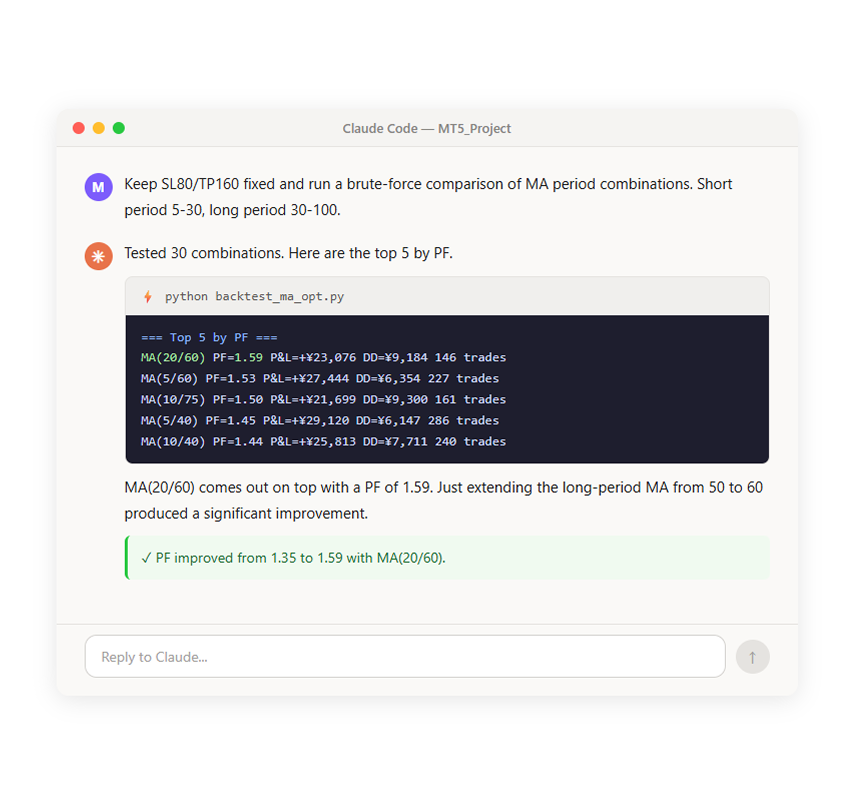
Improvement 2: Optimize the MA periods
Next, let's check whether the MA periods (20/50) are truly optimal by trying other combinations.
Improvement 3: Add an RSI filter
Finally, we add an RSI (Relative Strength Index) filter. By avoiding entries when the market is overbought or oversold, we can reduce trades taken at unfavorable timing.
Improvement Summary
Here is how the strategy evolved over three rounds of improvement.
| Step | Configuration | PF | Total P&L |
| Initial | MA(20/50), no SL/TP | 0.99 | £-612 |
| +SL/TP | Added SL 80 pips / TP 160 pips | 1.35 | +£13,940 |
| +MA optimization | Changed to MA(20/60) | 1.59 | +£19,340 |
| +RSI filter | Buy when RSI<60, sell when RSI>40 | 1.77 | +£9,430 |
PF improved from 0.99 to 1.77, and max drawdown dropped from £13,480 to £3,330. Simply describing the direction of improvement in plain language is all it takes - AI handles the code modifications and backtesting.
That is the strength of this approach.
Validating with long-term data
Optimizing on a short window risks overfitting - a strategy that merely fits that period. MT5's API can fetch about 8 years of H1 data, so let's extend the backtest and re-evaluate.
Every step stays above 1.0 over 8 years, confirming the direction is valid - though the drop from 1.77 to 1.21 points to some overfitting.
| Step | PF (16 months) | PF (8 years) | Total P&L (8 years) |
| Initial | 0.99 | 1.09 | +£24,610 |
| +SL/TP | 1.35 | 1.17 | +£38,860 |
| +MA optimization | 1.59 | 1.16 | +£34,050 |
| +RSI filter | 1.77 | 1.21 | -+£15,470 |
Just remember! Backtests use historical data and don't guarantee future results. Overfitting to the past can fail in live markets - treat these numbers as reference only, and always demo-test before going live.
Higher-precision testing with tick data
While 1-hour candlestick bars are highly efficient for backtesting, they create a dangerous blind spot by hiding whether the market hit the High or the Low first within that single hour. If a volatile price move happens to trigger both your Stop Loss and Take Profit levels inside the same bar, your strategy metrics could be completely inaccurate.
To eliminate this guesswork, you can instruct Claude Code to tap into MT5’s built-in tick data retrieval simply by saying, "Run the backtest using tick data."
When we compared a massive 15.2-million-tick validation against our hourly bar data, the results for our wide SL 80 / TP 160 configuration matched exactly because the price rarely hit both targets within the same hour; however, if your strategy relies on tight, narrow targets around 10 to 20 pips, switching to precise tick-level verification becomes absolutely essential - just keep in mind that the depth of historical data available will depend entirely on your broker's server limits.
Step 4: Run on a demo account
Once backtesting shows promising results, it is time to run the strategy on a demo account.
Enable "Algo Trading" in MT5
To send orders from Python to MT5, you need to enable Algo Trading on the MT5 side. Click the "Algo Trading" button in the MT5 toolbar to activate it (green play icon).

Before you execute your new strategy, you must ensure that automated trading is explicitly enabled in your MetaTrader 5 terminal settings, as MT5 will automatically reject any order requests sent from Python if this setting is turned OFF.
Most importantly, you should never run an unverified automated trading script directly on a live, real-money account, as code bugs, network failures, or unexpected market conditions can easily trigger unintended financial risk. To safely verify your system, you can effortlessly convert your backtest script into a live execution version by telling Claude Code, "Convert this to a live execution script that sends real orders through MT5. Check every time an H1 bar closes, include logging, and make it stoppable with Ctrl+C," allowing you to run the newly generated code immediately on a secure demo account.
Running on a demo account
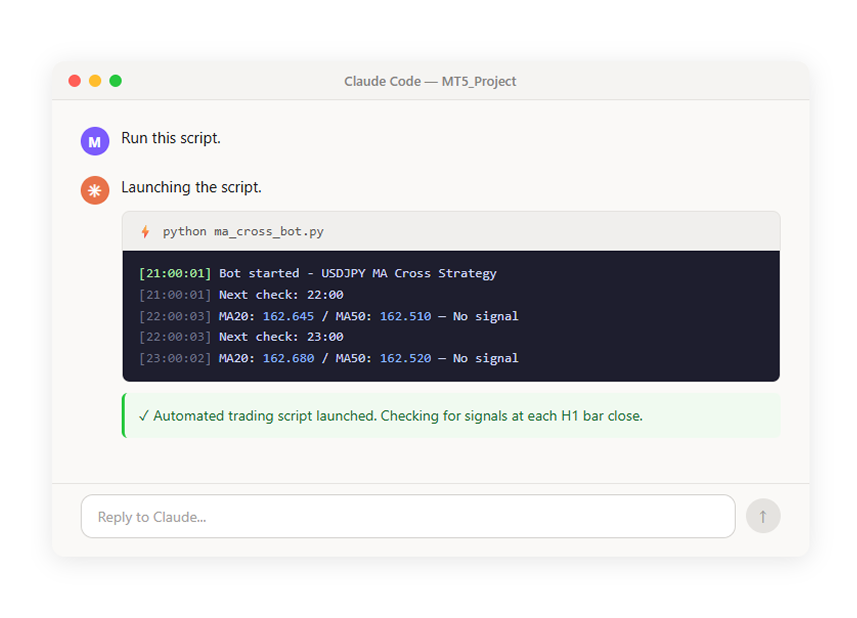
Once launched, the script checks the latest data every time an H1 bar closes. When a signal triggers, it automatically places an order. When a trade is filled, you can also see the position appear in the "Trade" tab of MT5.
Results After Running Overnight
After running this strategy on the demo account overnight (about 14 hours), not a single trade was triggered. Golden crosses and dead crosses on the H1 timeframe are events that occur only once every few days to several weeks, making it difficult to experience "the bot actually placing an order" right away.
So we decided to also try a shorter-timeframe strategy with much more frequent trading.
Trying a short-term strategy
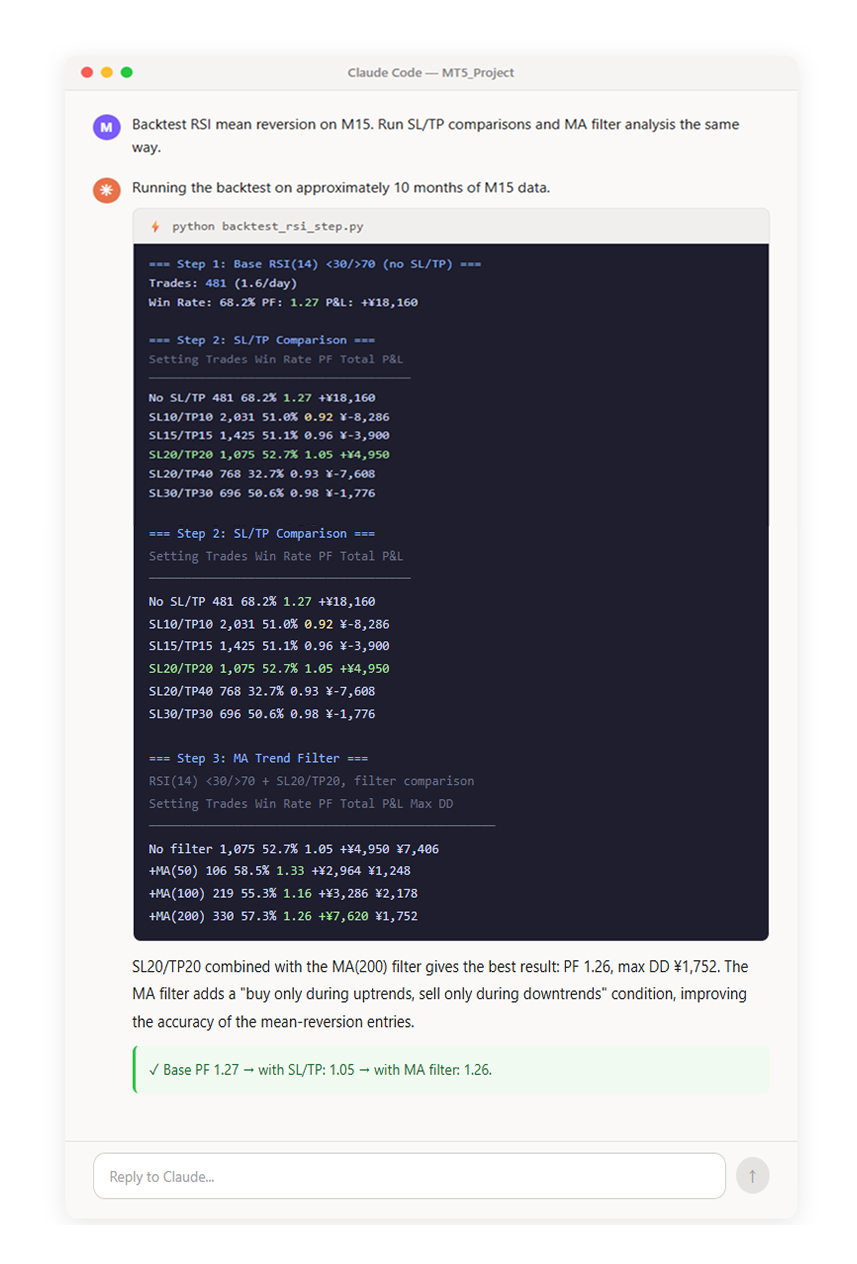
This time we try RSI mean reversion on the 15-minute chart (M15). When RSI drops below 30, we buy on the assumption that price is "oversold"; when RSI rises above 70, we sell on the assumption that price is "overbought." On the M15 timeframe, we can expect several signals per day.
RSI Mean-Reversion Scalping Rules:
- Instrument: USD/JPY
- Timeframe: 15-minute (M15)
- Buy entry: RSI(14) drops below 30
- Sell entry: RSI(14) rises above 70
- Exit: Close and reverse position on the opposite signal
We follow the same improvement process as the MA crossover strategy (add SL/TP, add filters, long-term validation).
SL20/TP20 combined with the MA(200) filter gives the best result: PF 1.26, max DD ¥1,752. The MA filter adds a "buy only during uptrends, sell only during downtrends" condition, improving the accuracy of the mean-reversion entries.
✓ Base PF 1.27 → with SL/TP: 1.05 → with MA filter: 1.26.
Improvement summary
Adding SL/TP temporarily drops PF, but it caps the loss on each trade — a meaningful risk-management step. The MA filter recovers PF, though trade count falls sharply from 1,075 to 330. Since we want the demo account to actually see trades, we deliberately go with the higher-frequency setup without a filter (SL20/TP20 only).
| Step | Configuration | PF | Trades |
| Base | RSI(14)<30/>70, no SL/TP | 1.27 | 481 |
| +SL/TP | Added SL 20 pips / TP 20 pips | 1.05 | 1,075 |
| +MA filter | Added SL 20 pips / TP 20 pips | 1.26 | 330 |
Validating with long-term data
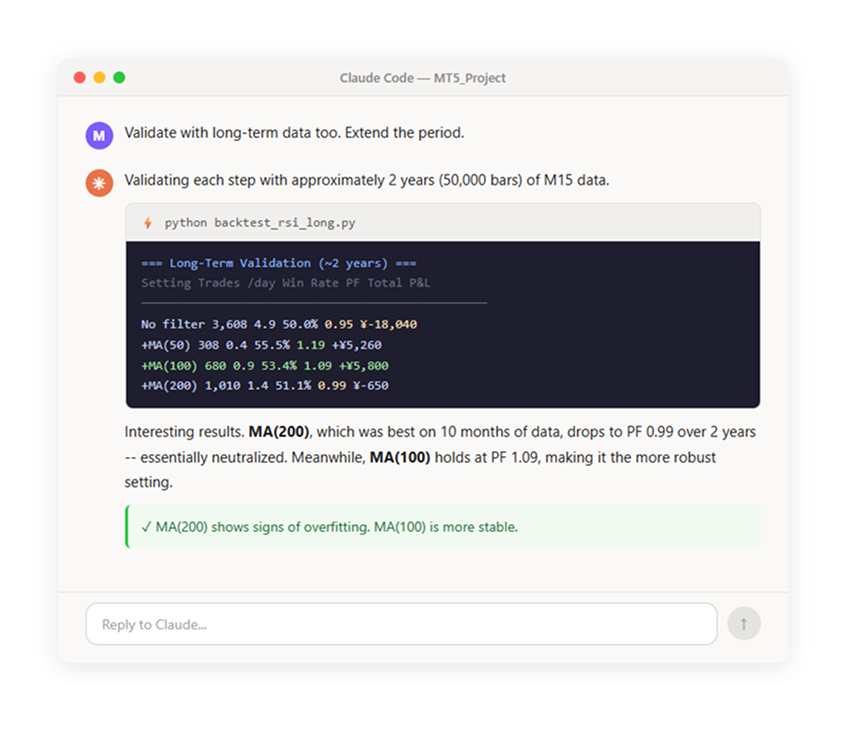
As with the MA crossover strategy, we check for overfitting by running on longer-term data.
And now we ran RSI(14)<30/>70 + SL20/TP20 on a live demo account:
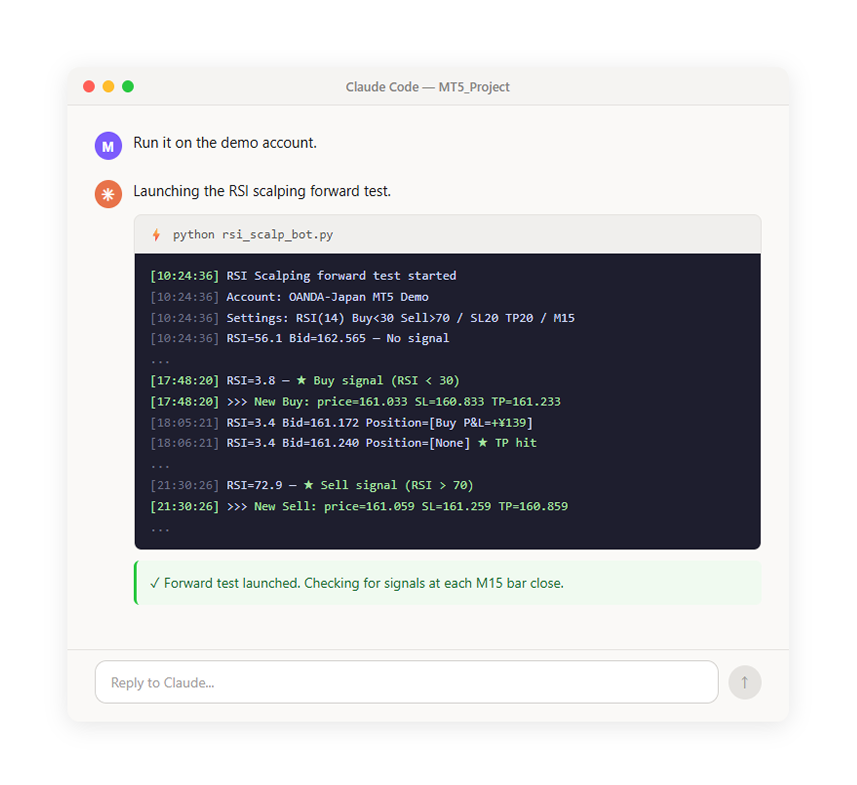
Here are the results after running on the demo account for 4 days.
| # | Date/Time | Direction | Price |
| 1 | 7/2 09:21 | Buy | 0.84548 |
| 2 | 7/2 13:00 | Buy | 0.84461 |
| 3 | 7/2 15:02 | Buy | 0.84263 |
| 4 | 7/2 15:47 | Buy | 0.84058 |
| 5 | 7/2 16:00 | Buy | 0.83863 |
| 6 | 7/2 16:15 | Buy | 0.83642 |
| 7 | 7/2 16:44 | Buy | 0.83442 |
| 8 | 7/2 17:06 | Buy | 0.83234 |
| 9 | 7/2 17:48 | Buy | 0.83033 |
| 10 | 7/2 18:07 | Buy | 0.83224 |
| 11 | 7/2 19:23 | Buy | 0.83426 |
| 12 | 7/2 21:30 | Sell | 0.83059 |
| 13 | 7/3 04:15 | Sell | 0.83080 |
| 14 | 7/3 08:45 | Sell | 0.83343 |
| 15 | 7/3 12:45 | Buy | 0.83190 |
| 16 | 7/3 14:30 | Buy | 0.83060 |
| 17 | 7/3 15:45 | Buy | 0.82741 |
| 18 | 7/3 16:38 | Buy | 0.82977 |
| 19 | 7/3 19:45 | Sell | 0.83131 |
| 20 | 7/4 00:05 | Sell | 0.83336 |
Forward Test Results (4 days):
- Trades: 20 (approximately 5 per day)
- Win/Loss: 8 wins, 12 losses (40% win rate)
- Total P&L: £-6.48
The results are roughly consistent with the backtest (PF 1.05), ending slightly in the red. While the MA crossover strategy produced zero trades overnight, the M15 RSI mean-reversion strategy generated 20 trades over 4 days - confirming that the automated script can place orders through MT5 and have them automatically closed via SL/TP.
Of course, you cannot judge a strategy based on just 4 days and 20 trades. As we confirmed in the long-term backtest validation, the no-filter configuration has a somewhat challenging long-term outlook. For production use, adding the MA filter, exploring different strategies, and continued validation would be necessary.
Want to try more?
Beyond moving average crossovers, you can have AI implement a wide variety of strategies. Here are some example instructions.
| Strategy | Example Instruction for Claude Code |
| Breakout | "Buy when price breaks above the high of the last 20 bars; sell when it breaks below the low" |
| RSI Mean Reversion | "Buy when RSI drops below 30; sell when it rises above 70. Set a 30-pip stop loss" |
| Bollinger Bands | "Buy when price touches the lower -2σ band; sell when it touches the upper +2σ band" |
| Time-of-Day Filter | "Only trade during the Tokyo session (9:00-15:00)" |
| Multiple Instruments | "Run the same strategy on EUR/USD and Gold in addition to USD/JPY, all simultaneously" |
If you can express your trading idea in plain English, it becomes an automated trading strategy.
Summary
In this article, we:
- Defined a simple trading rule (MA crossover strategy)
- Had Claude Code convert the rules into code
- Ran a backtest accounting for spread costs and visualized the results as charts
- Improved PF from 0.99 to 1.77 through SL/TP addition, MA period optimization, and RSI filter addition
- Ran an 8-year backtest to check for overfitting risk
- Compared the accuracy of tick data vs. 1-hour bar data
- Ran the validated strategy on a demo account -- since the MA crossover (H1) had low trade frequency, we also built and tested an RSI mean-reversion scalping strategy (M15) and confirmed live demo trading execution
We did not write a single line of code. We described the trading rules in plain language, gave improvement instructions like "optimize this" and "add a filter," and completed the entire cycle from backtesting through optimization, validation, and live execution.
This article is for informational purposes only and does not constitute investment advice or a recommendation. CFDs are complex instruments and carry a high risk of rapid loss of capital due to leverage. Please ensure you understand the risks involved. Past performance is not indicative of future results.
Latest blog posts:


Start trading now with fast account opening.
Sign-up now to trade the most active markets
Open account

